A second language for your WordPress site.
Every translation is a real page.
Site Translator serves your site in two languages at two addresses — your content where it is, the translation under its own prefix like /th/. Each translation is an ordinary page or post, so you write it in the editor you already use: the block editor, Elementor, Flatsome. Menus, the language switcher and the hreflang tags follow on their own.
Why bilingual sites so often go wrong
Most ways of adding a language bolt something onto the page: a layer that swaps words while the page is served, a cookie that decides the language, a service in the middle. Search engines, page builders and visitors all pay for it.
One address, two languages
When a cookie or a script picks the language, search engines see one URL whose words keep changing. The second language never ranks, and a shared link opens in whichever language the reader had last.
Words swapped, not pages written
A layer that replaces sentences in the finished page has to find every one of them again on every visit. A sentence the theme or the builder changes becomes a missing translation, and you translate fragments out of context.
Every page pays for it
Rewriting each page as it is served, a script to switch the language, a request to an outside service — costs that every visitor carries on every page.
Every translation is a real post
Site Translator adds a language the way WordPress already works: one click copies a page into the other language, you rewrite it in your own editor, and the two stay linked. Nothing is swapped while the page is served.
One click, a complete copy
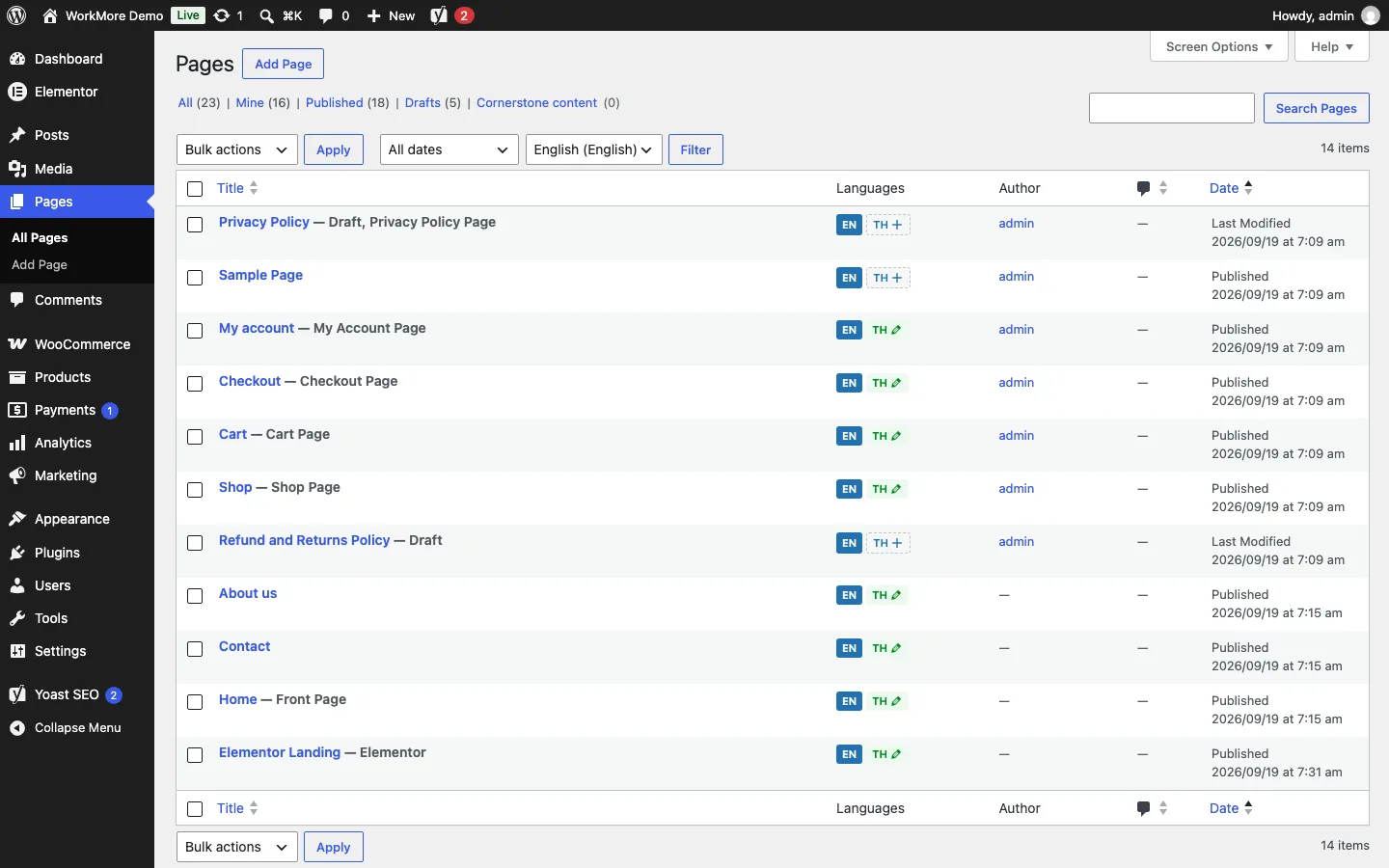
The Languages column in every post and page list creates a draft in the other language — content, builder layout, featured image, template, parent and custom fields — and opens it for translation.
Written in your own editor
A translation is an ordinary post, so it opens in the block editor, Elementor, Flatsome's UX Builder or whatever you use. You translate in place, with the layout in front of you.
Linked both ways
The original and its translation know each other, so the switcher, the hreflang tags and the admin bar always point to the right page. Categories and tags are translated and linked the same way.
Three steps to your second language
Your existing content stays where it is, at the same addresses. Nothing is copied until you create a translation.
Install
Install the free plugin and open Settings → Site Translator. Everything that already exists becomes your default language, every URL unchanged.
Choose the languages
Pick your default language and the second one. WordPress's own language pack installs in one click, so buttons, dates and forms follow on translated pages.
Translate
Click "+" in a page's Languages column, rewrite the copy in your editor and publish. Build a menu in the new language, add the switcher, and the site is bilingual.
Why Site Translator
Its own address for each language
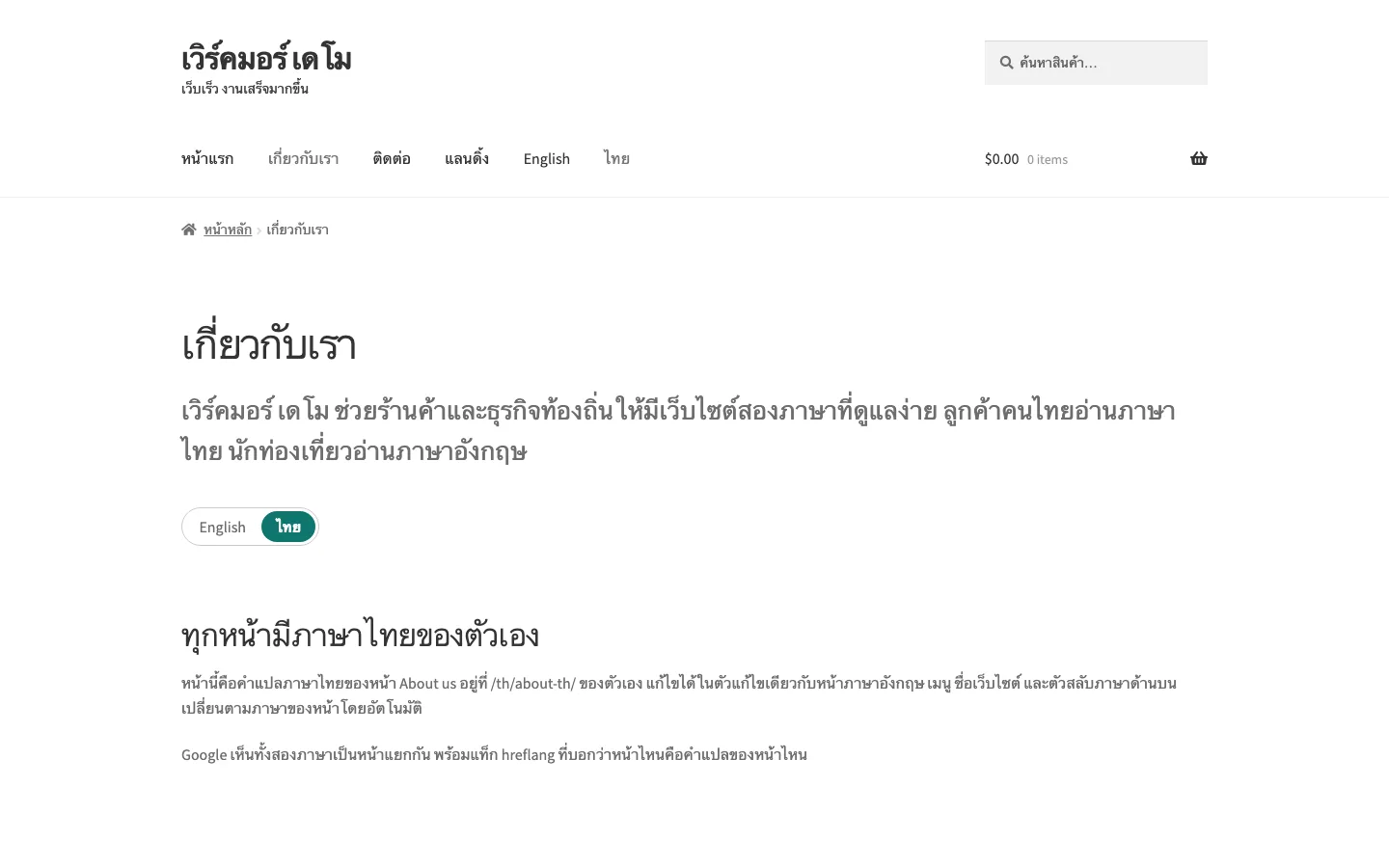
Your content at example.com/, the translation at example.com/th/ — one URL per page, indexed separately. A page opened under the wrong prefix is redirected to its own.
Menus per language
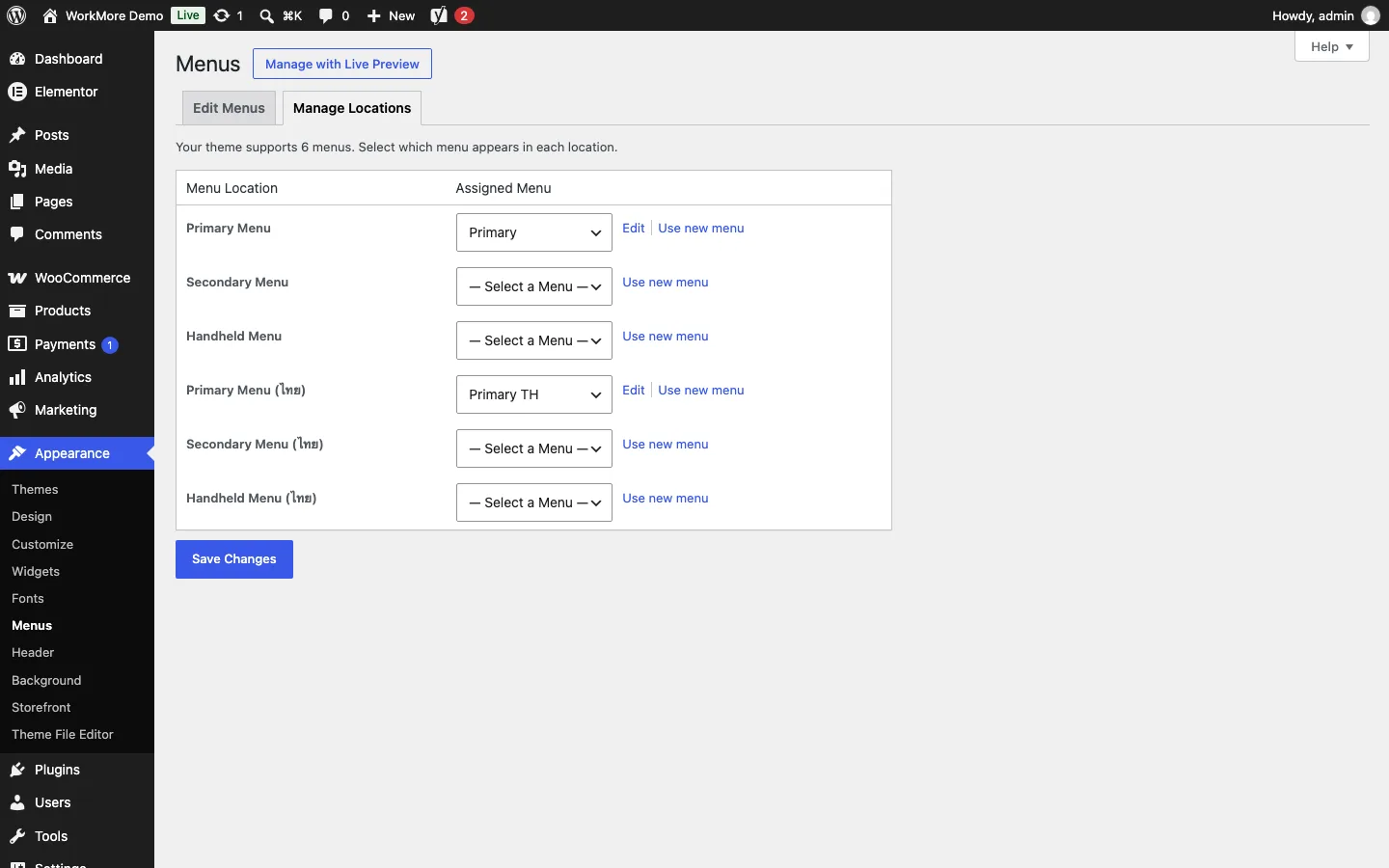
Every menu location of your theme gets a twin for the second language under Appearance → Menus. Assign a menu built in that language — no theme changes.
A switcher that fits
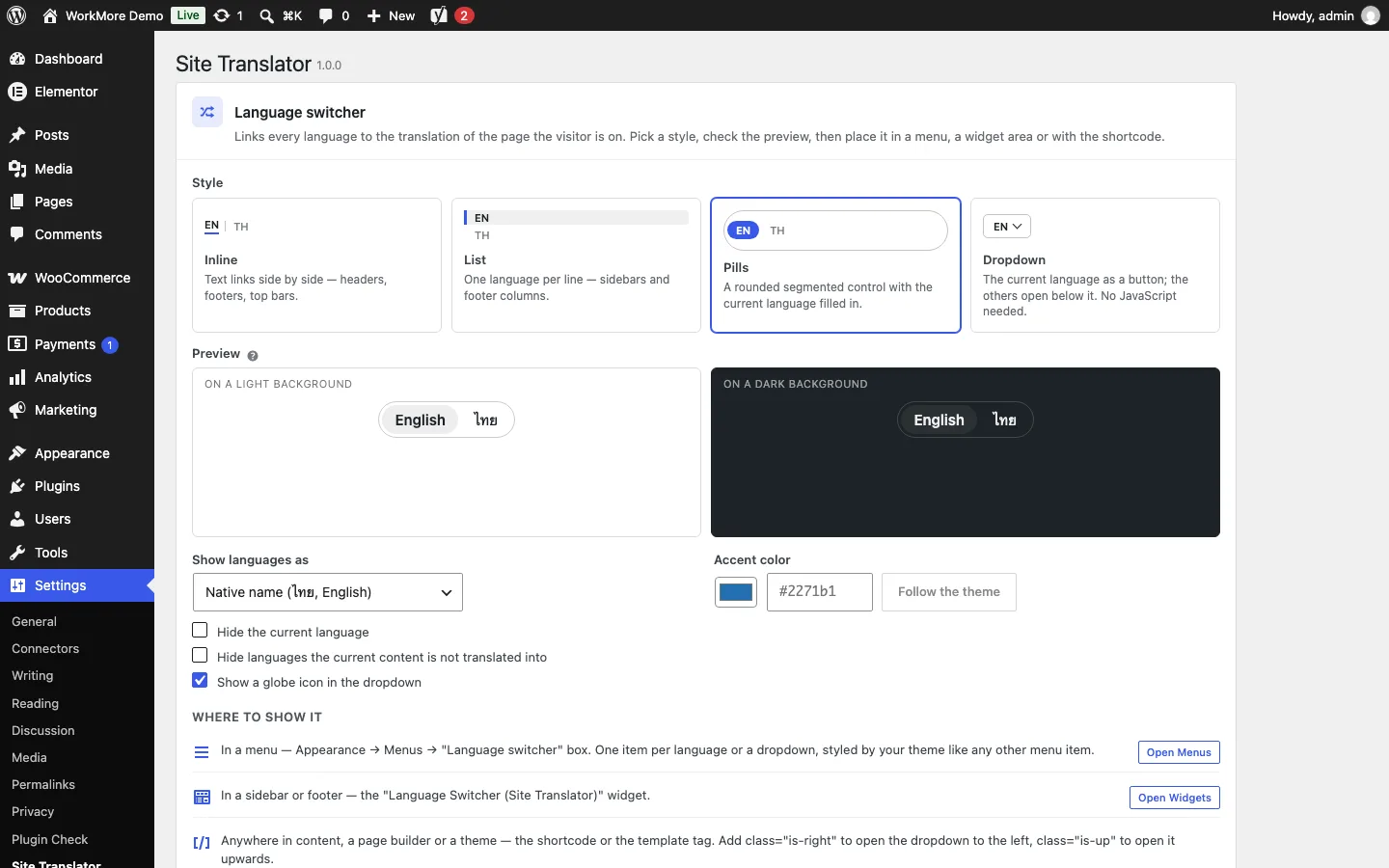
Inline links, a list, pills or a dropdown, with an accent colour and a live preview — as a menu item, a widget, a shortcode or a template tag. It takes the colour of the text around it, on light and dark headers alike.
Language packs do the interface
On translated pages WordPress loads that language's own packs, so core, your theme and your plugins show their buttons, dates and labels in it without extra work.
Site title and tagline per language
The name and tagline in the header, the browser tab and the search results change with the language.
Nothing heavy on your pages
No JavaScript and no stylesheet files on the public site. Lists are filtered by one indexed query clause, and the switcher brings its few kilobytes of CSS only where it shows.
See it in action
Search engines see two sites, not one mixed one
Each language gets what a search engine needs to index it on its own and to send every visitor to the right one.
hreflang, both ways
Every translated page names its counterpart and an x-default in its head, generated from the translation links — never typed by hand — next to WordPress's own self-referencing canonical.
A sitemap per language
Each language's sitemap is listed in robots.txt, with WordPress's built-in sitemaps, Yoast SEO or Rank Math.
Lists that stay in one language
Visitors under /th/ see Thai content only: archives, search, feeds, category and page lists, next and previous links. The front page and the posts page map to their translations.
Pro: a shop in every language
With WooCommerce, Pro translates the whole shop and keeps the languages in step, so an order never depends on the language the customer browsed in.
Products and variations
Products copy with their variations, and their categories, tags and attributes map to the translations — ready to be written in the other language.
Price and stock in sync
Price, stock, SKU and shipping details stay shared between translations: change them once, in either language, and every order counts against the same stock.
Every shop page, per language
Shop, cart, checkout and account pages resolve to their translations, and the cart follows a visitor who switches language.
Orders in the customer's language
Each order remembers its language, and the customer's emails are sent in it.
Free and Pro
The free plugin is complete for a site with two languages, its posts and its pages — nothing in it is locked or counted. Pro is a separate add-on that brings more languages, more content types and the shop.
| Free | Pro | |
|---|---|---|
| Languages | Default + 1 | Unlimited |
| Posts, pages, categories and tags | ✓ | ✓ |
| Menus per language, language switcher, hreflang and sitemaps | ✓ | ✓ |
| Works with the block editor, Elementor, Flatsome and other builders | ✓ | ✓ |
| Custom post types and taxonomies (portfolios, Elementor templates, UX Blocks…) | — | ✓ |
| WooCommerce: products, variations, categories and attributes, synced price and stock, shop/cart/checkout pages per language, order language | — | ✓ |
| Priority support and automatic updates | — | ✓ |
The honest version: a blog or a company site in two languages needs only the free plugin. Pro earns its place when you sell with WooCommerce, when your content lives in custom post types, or when a third language is on the way.
The same table the free plugin shows on its "Upgrade to Pro" tab.
Who it is for
Businesses with visitors from abroad
A Thai site with an English version for tourists and partners — or the other way round — each language written properly and found in its own search results.
Shops that sell in two languages
A WooCommerce store where both languages share one stock, one price list and one order history, and customers get their emails in their own language.
Agencies building with page builders
Client sites on Elementor or Flatsome, translated inside the builder itself and handed over with menus and a switcher that need no code.
Pricing
Personal
- Unlimited languages
- Custom post types and taxonomies
- WooCommerce products and variations, synced price and stock
- Shop, cart, checkout and account pages per language
- Order language, customer emails in it
- Priority support and automatic updates
- Updates & support while active
- Nothing breaks if it lapses
Available soon
Business
- Unlimited languages
- Custom post types and taxonomies
- WooCommerce products and variations, synced price and stock
- Shop, cart, checkout and account pages per language
- Order language, customer emails in it
- Priority support and automatic updates
- Updates & support while active
- Nothing breaks if it lapses
Available soon
Agency
- Unlimited languages
- Custom post types and taxonomies
- WooCommerce products and variations, synced price and stock
- Shop, cart, checkout and account pages per language
- Order language, customer emails in it
- Priority support and automatic updates
- Updates & support while active
- Nothing breaks if it lapses
Available soon
Frequently asked questions
Does it translate automatically?
No. Site Translator gives every translation its own real page and keeps the two linked; the words are yours or your translator's. Text from any translation tool can be pasted into the copy — it is an ordinary page in your editor.
Does it work with Elementor, Flatsome and other builders?
Yes. A translation is a copy of the page including the builder's data, so it opens in Elementor, Flatsome's UX Builder or any other builder exactly like the original, and you translate the texts in place.
What happens to my existing content?
Everything that exists when you activate the plugin is in your default language and keeps its URL. Nothing is copied or changed until you create a translation.
Which language should be the default?
The one most of your content is written in. Visitors get it at your plain URLs and the second language under its prefix (/th/, /en/ …).
Does it slow my site down?
No. A language is an ordinary term on each post, lists are filtered by one indexed clause, and the only output besides the hreflang tags is the switcher's small inline CSS on the pages that show one.
What happens if I uninstall it?
Deactivating deletes nothing. Uninstalling removes language assignments, links and settings only if you opted in; translated pages are ordinary content and are never deleted.