A cookie banner that really waits.
On your own site, with no quota.
Cookie Crumb asks your visitors which cookies they allow and holds everything else back until they answer: the scripts, videos, maps and pixels of the services you list do not run and do not load first. It scans your site for cookies, keeps a record of every answer, and lives inside your WordPress — no account to open, no outside service, no page view quota.
A banner alone has asked nothing
Showing a banner is the easy part. What counts is what happens before the visitor answers — and what you can show for it afterwards.
The banner shows, the scripts run anyway
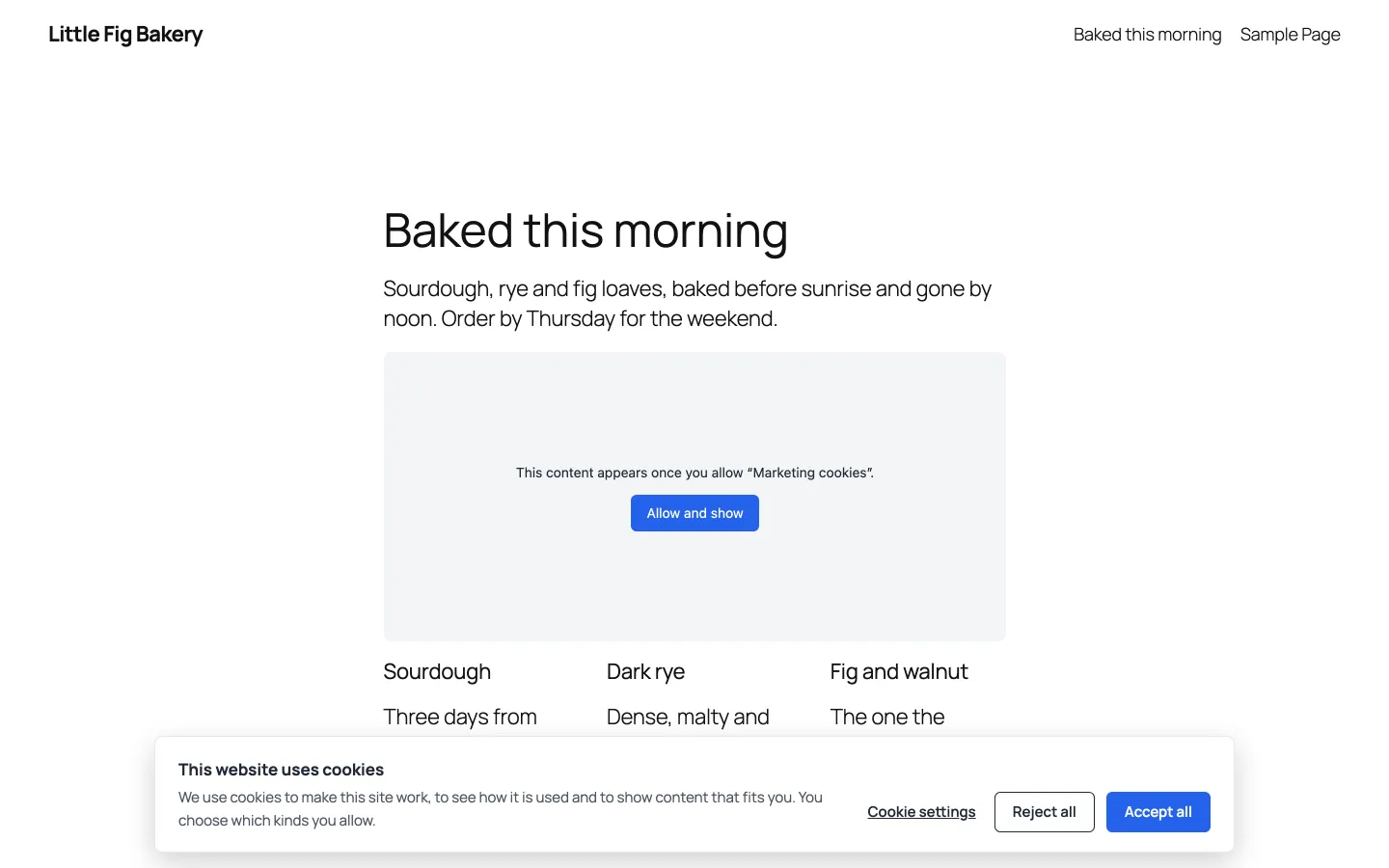
Many banners only inform: analytics, ad pixels and embedded videos load with the page, before anyone has chosen. What the visitor clicks then changes very little.
Rented by the page view
Hosted consent services count your visitors and charge by the tier. The banner comes from their server, and so does every record of what your visitors chose.
No record to show
When someone asks what a visitor agreed to and when, a banner without a log has no answer — and a log that keeps full IP addresses is a problem of its own.
Nothing runs before the answer
Scripts are held in two places by one list of rules: where the page is built, and in the browser. The page itself is the same for every visitor, so caches keep working.
Held in the page
Before a page leaves your server, the scripts, frames and pixels of the services you list are switched off in its markup: they neither run nor load.
Held in the browser
A script of about 1 KB at the very top of the page catches what other scripts add later — a tag manager's tags, a widget's loader — by the same rules.
Released by category
When a visitor allows a category, its scripts run in the order the page wrote them, and a held-back video or map shows a placeholder with a button of its own. Taking consent back deletes the listed cookies and loads the page without them.
Three steps to a published banner
Nothing changes for your visitors until you press Publish.
Scan
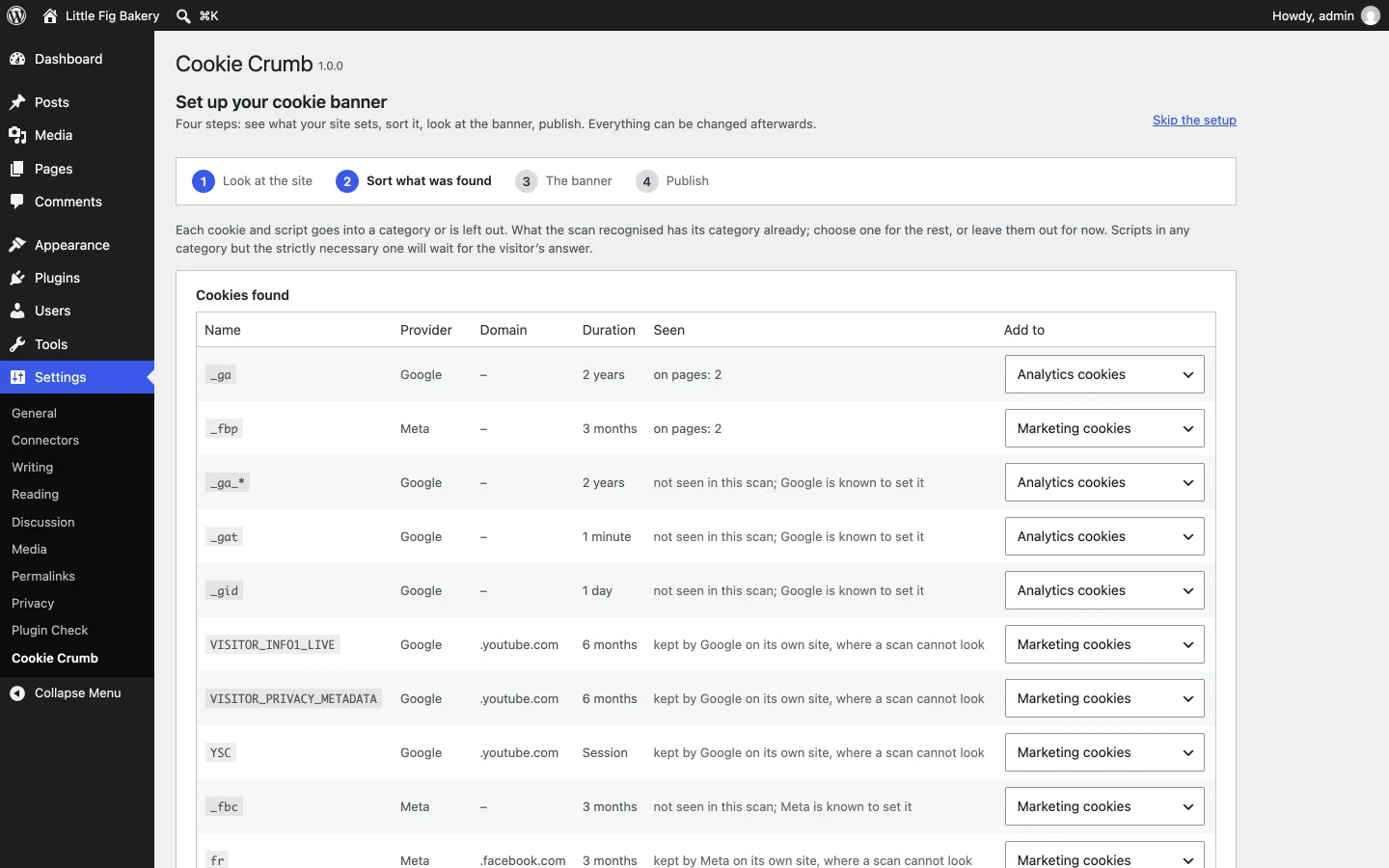
Install the free plugin and open Settings → Cookie Crumb. The setup opens your pages in your own browser, the way a visitor gets them, and lists the cookies they set and what they load from other sites.
Sort
Known services arrive with a category suggested. Give the rest a category or leave them out: each choice becomes a line of your cookie list and a rule that holds a script back.
Publish
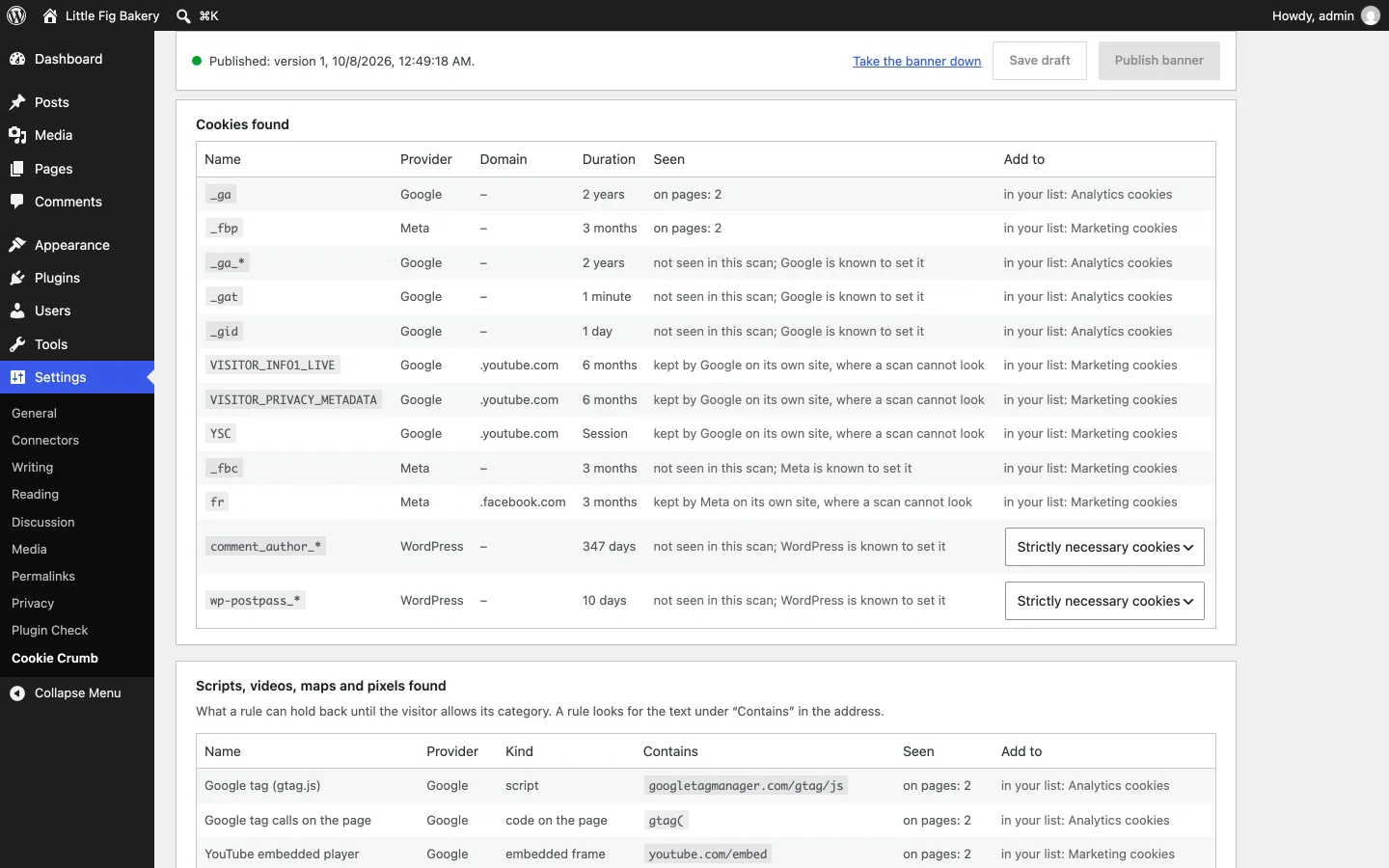
Look at the banner on your own pages at desktop, tablet and phone widths, then publish. Scan again, and the plugin lists whatever still loads before a visitor answers.
Why Cookie Crumb
Scripts that really wait
Google Analytics, Tag Manager, Google Ads, YouTube, Google Maps, Meta Pixel and Facebook embeds are known from the start. Any other script is held by a rule that looks for a piece of its address.
A scan that shows what leaks
After you publish, the scan opens your pages as a visitor who has not answered, lists what still reached another site, and says for each whether a rule can hold it.
A record of every answer
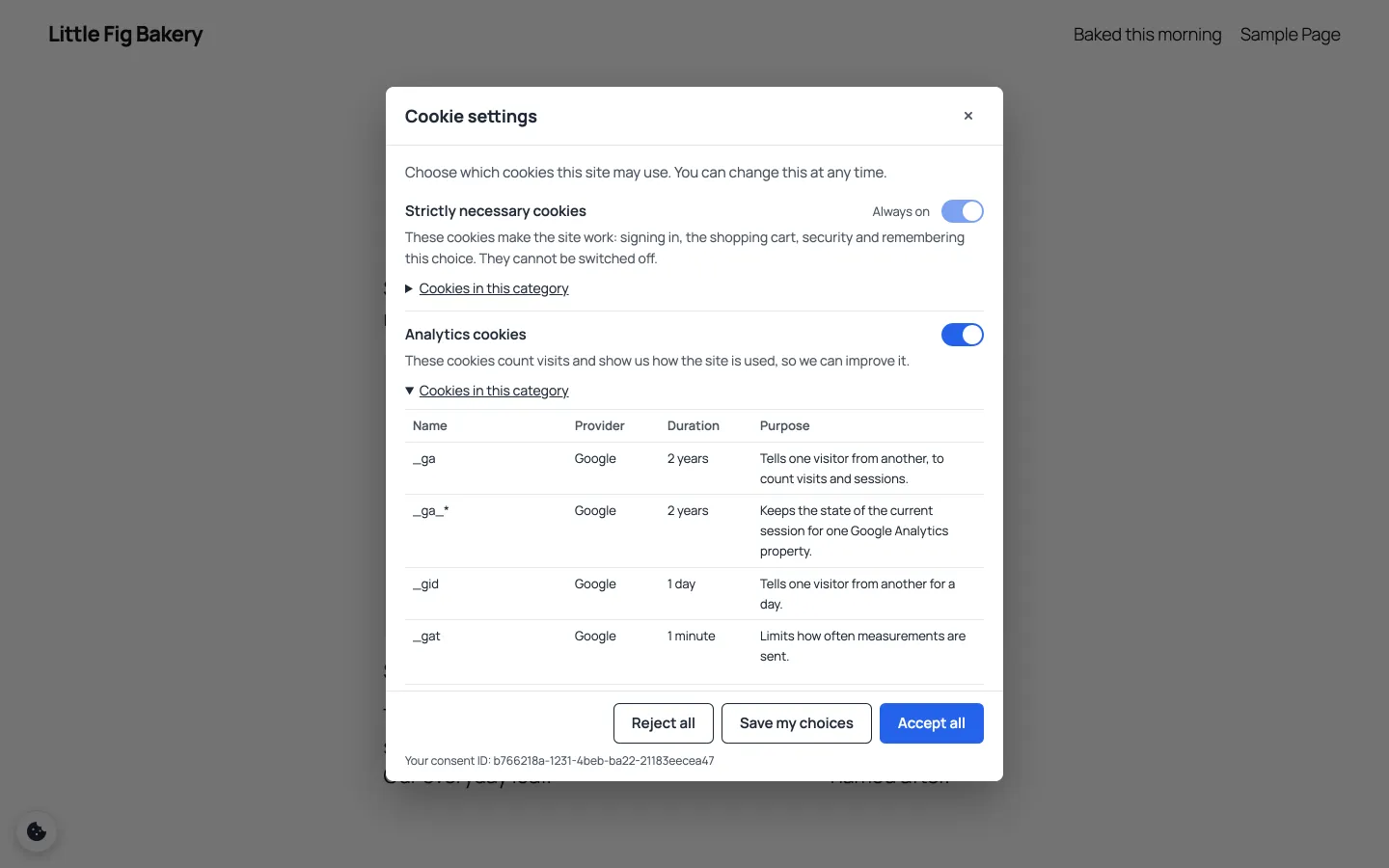
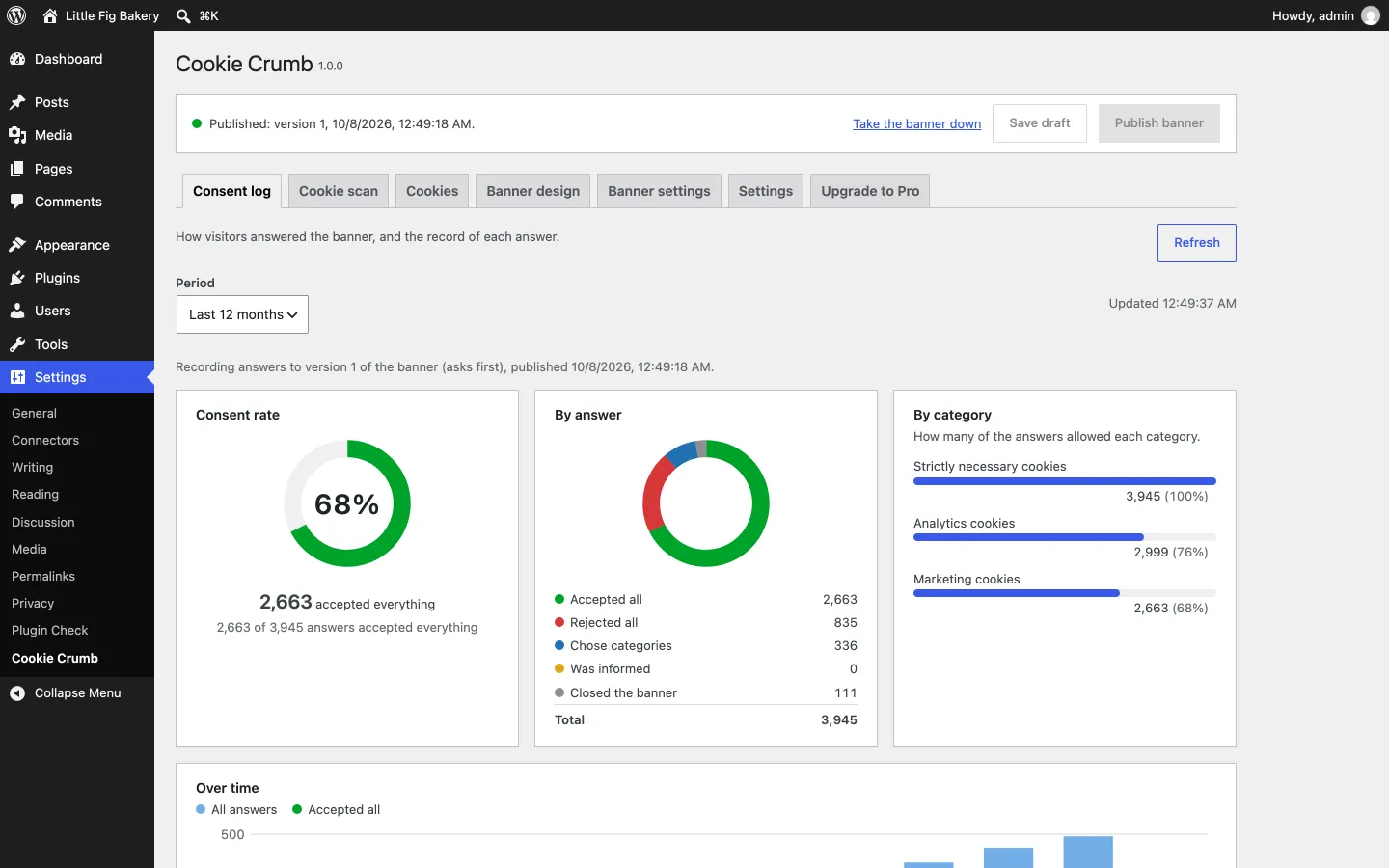
One row for each decision, found by the consent ID the visitor sees in the settings window, exported as CSV. No full IP address, no cookie values, nothing tied to an account. The log keeps the last 90 days.
Draft, preview, publish
Edit a draft beside a live preview of your real site. Visitors see nothing new until you publish, and every record names the version of the banner that was answered.
Signals other tools understand
Google Consent Mode v2 is set to "denied" before the answer and updated with it, and plugins that ask the WP Consent API are told the visitor's choice.
A dashboard, and page views
How many accepted, rejected or chose, which categories were allowed and how that changed over time — with page views by month, counted on your own site.
See it in action
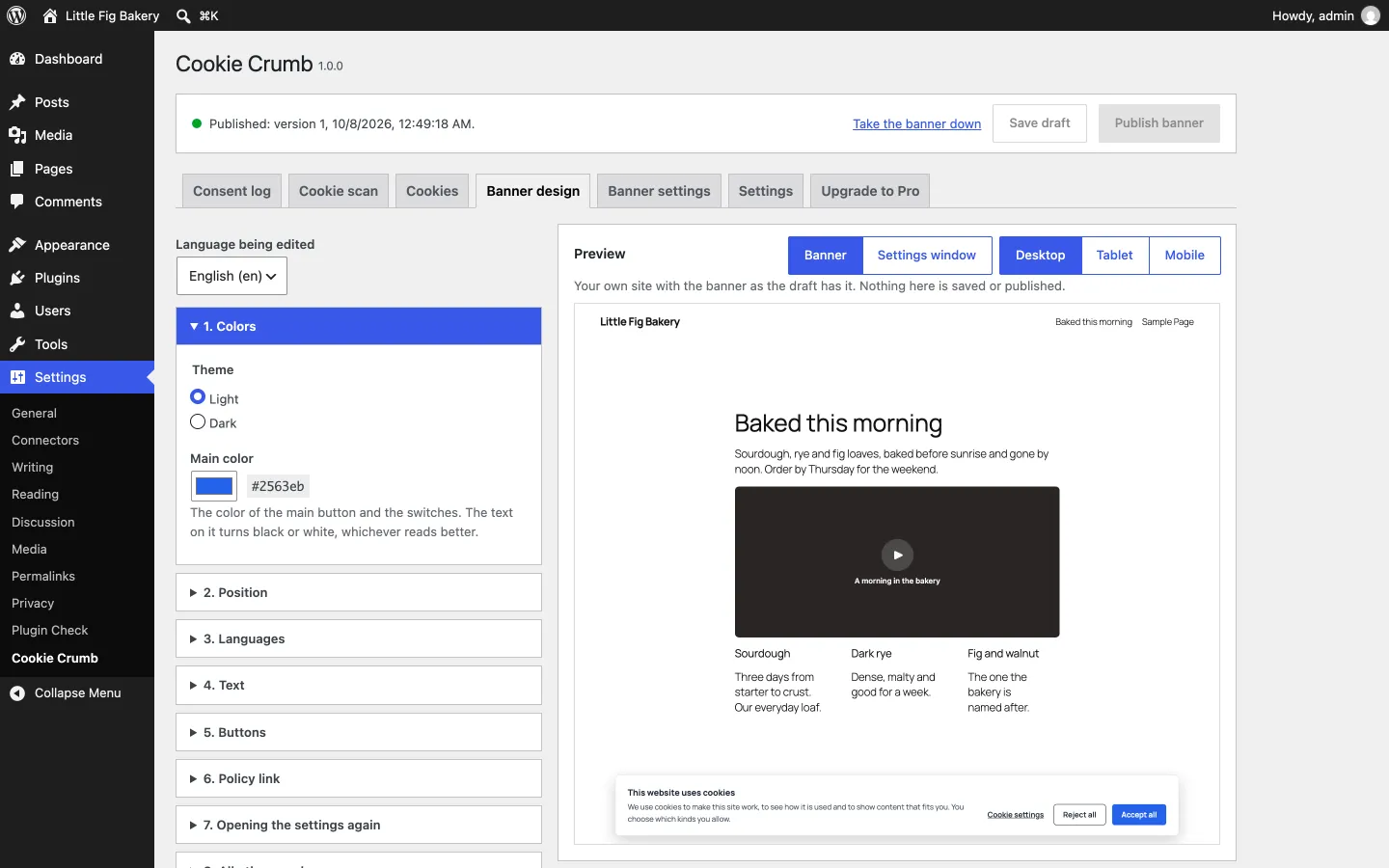
Light for your visitors
A consent banner sits on every page of a site. This one was built to cost those pages next to nothing.
One small file
A small inline script and one deferred file of about 7 KB: no jQuery, no framework, no font, and no request to any other server.
The same page for everyone
The server never reads a visitor's answer, so page caches and CDNs work with no configuration. Publishing clears the page caches the plugin knows.
Nothing moves
The banner lies over the page and takes no room in it: your content does not jump when it appears.
Coming in Pro: your own database, and a banner made your way
Pro is a separate add-on, in development. It adds to the free plugin, which stays complete without it.
Consent records in a database of your own
A copy of every record goes on to your MySQL or MariaDB, your PostgreSQL or Supabase, or a signed webhook — where you decide how long it is kept. While the destination is down, the records wait and nothing is stored twice.
A banner in your brand
More positions, your logo, a color for each part, button styles and their order, rounded corners, and CSS of your own — still one small style sheet for your visitors, and no script.
A health check, and more known services
Checks that point out a setup working against you — a tracker listed as necessary, a missing "Reject all", something that still loads before the answer — and services common in Thailand, such as LINE Tag and TikTok Pixel, with Thai descriptions of their cookies.
Free and Pro
The free plugin is complete: the banner, the blocking, the scan, the log and the dashboard — nothing in it is locked or counted. Pro, a separate add-on in development, keeps consent records in a database of your own and adds more ways to shape the banner.
| Free | Pro | |
|---|---|---|
| Consent banner and cookie settings window, in any number of languages | ✓ | ✓ |
| Scripts, iframes and pixels that wait for the visitor's answer; Google Consent Mode v2; WP Consent API | ✓ | ✓ |
| Cookie scan and setup wizard | ✓ | ✓ |
| Consent log of the last 90 days on your site: search by consent ID, CSV export, dashboard, page views by month | ✓ | ✓ |
| Consent records sent on to a database of your own: MySQL or MariaDB, PostgreSQL (Supabase included), or a signed webhook | — | ✓ |
| More banner layouts, your logo, colors for each part, corner radius, button styles, custom CSS | — | ✓ |
| Health check: settings that put consent at risk, pointed out | — | ✓ |
| Services common in Thailand, with Thai descriptions of their cookies | — | ✓ |
| Support | ✓ WordPress.org forums | ✓ By email |
The honest version: the free plugin is all most sites need. Pro is for the site that has to keep its consent records longer than 90 days, or somewhere of its own, and for the banner that has to look like the brand.
The same rows the free plugin shows on its "Upgrade to Pro" tab. Pro is in development: its price is set, and the Buy button arrives with its release.
Who it is for
Sites in Thailand
Words in Thai and English from the start, and a banner set in your site's own typeface — Thai included. Pro adds the services Thai sites use, with their cookies described in Thai.
WooCommerce shops
The shop's own cookies are recognised — cart and session as necessary, order attribution as marketing — while analytics and ad pixels wait for the answer.
Agencies and site builders
No account per client and no quota to watch: the same plugin on every site, each with its own banner, cookie list and consent log — multisite networks included.
Pricing
Personal
- Consent records sent on to MySQL or MariaDB, PostgreSQL, Supabase or a signed webhook
- More banner positions, your logo, colors for each part, button styles, your own CSS
- A health check of your setup
- More known services, with Thai descriptions of their cookies
- Support by email and automatic updates
- Updates & support while active
- Nothing breaks if it lapses
Available soon
Business
- Consent records sent on to MySQL or MariaDB, PostgreSQL, Supabase or a signed webhook
- More banner positions, your logo, colors for each part, button styles, your own CSS
- A health check of your setup
- More known services, with Thai descriptions of their cookies
- Support by email and automatic updates
- Updates & support while active
- Nothing breaks if it lapses
Available soon
Frequently asked questions
Does it make my site comply with PDPA or GDPR?
No plugin can promise that, and this one does not. Cookie Crumb is a tool: it asks, it holds scripts back until the answer, and it keeps a record. Which cookies need consent, how to ask and how long to keep a record depend on the law that applies to your site — that is for you or your adviser to check.
Does it work with a page cache or a CDN?
Yes. The server sends the same page to every visitor and never reads the visitor's answer; what runs is decided in the browser. Publishing the banner asks the cache plugins and hosts the plugin knows to clear their page cache — WP Rocket, LiteSpeed Cache, W3 Total Cache, WP Super Cache and others; for any other cache, clear it after publishing.
Does it work with Google Tag Manager and Consent Mode?
Yes. Before a visitor answers, the Consent Mode v2 signals are set to "denied" and they are updated with each answer. You choose how Tag Manager itself is treated: listed under a category, the container waits for that category like any other script; left out of the list, it loads and its tags follow the Consent Mode signals.
Which services does it recognise?
Google Analytics, Google Tag Manager, Google Ads, YouTube, Google Maps, Meta Pixel and Facebook embeds, and the cookies WordPress and WooCommerce set themselves. Anything else the scan finds is shown as not known, and you choose its category. A script is held back by a rule that looks for a piece of its address, so any script can be listed.
Can everything be held back?
Scripts and embedded frames always can, and images and loading hints when they stand in the page's markup. What a script that is already running sends by itself, and style sheets and fonts loaded from another site, cannot be held by a rule: hold back the script that does it, or serve the file from your own site. After you publish, the scan lists whatever still reaches another site before a visitor answers.
What does a consent record hold about a visitor?
As little as it takes to be a record: a random consent ID, the time, the answer and the categories it allowed, the version and language of the banner, the page without its query string, the browser's name and major version, and the network part of the IP address — the last part is never stored. A record is not linked to a user account, and is deleted after 90 days.
Does the plugin connect to an outside service?
No. The banner, its script and the cookie list are served by your own site, answers and page views are recorded in your own database, and the plugin makes no request to any other server and adds no credit or link to your pages.
How can visitors change their answer?
A small round button stays in a corner of every page and opens the cookie settings window. Instead of it, or as well, any link to #cookie-settings opens the window, and so does the [wmcc_settings] shortcode.
In which languages is the banner?
In any you add: each language has its own words, and the banner follows the language of the page. Words are ready in English and Thai; for another language you start from the English ones and write your own.
Is the free plugin on WordPress.org?
Not yet: it is waiting for its review there. Until it is listed, the setup guide has the download; a site that installs it now updates from WordPress.org once it is listed — it is the same plugin, under the same name.
When can I buy Pro?
When it is released: the add-on is in development, after the free plugin. Its price is on the pricing page, and its Buy button appears there on the day it can be bought.
What happens if I deactivate or uninstall the plugin?
Deactivating takes the banner off and stops holding scripts back at once; nothing in your content was changed, so there is nothing to undo. Uninstalling removes the consent log, the statistics and the settings only if you asked for it under Settings — the switch is off by default, because a consent log is a record you may be asked for.