One screen for your whole design.
Thai and Latin, no CSS to write.
Design Controller gives a WordPress site one place for its design system — fonts, type scale, colours, spacing, shape and component styles. Change a value, watch the real site follow in the live preview, publish. Nothing is written into the Customizer, the Site Editor or your page builder, so deactivating it puts everything back.
Why one brand colour ends up in five places
A WordPress site collects its design from wherever each tool keeps it — the Customizer, the Site Editor, a page builder, WooCommerce, a stylesheet somebody wrote years ago. The same colour and the same font, five times over, and every change means hunting through all of them.
Five copies of one value
The brand colour lives in theme options, in Global Styles, in the builder's kit and in Additional CSS. Change it in one place and the other four stay old.
Fonts loaded twice
The theme requests Google Fonts, the builder requests them again, a plugin adds a third copy — visitors pay for every one, and Thai text still falls back to a face nobody chose.
Nobody dares to touch it
Every setting is a risk when nobody knows what else reads it. So the design freezes, and small fixes wait for a developer.
One document. Everywhere, at render time.
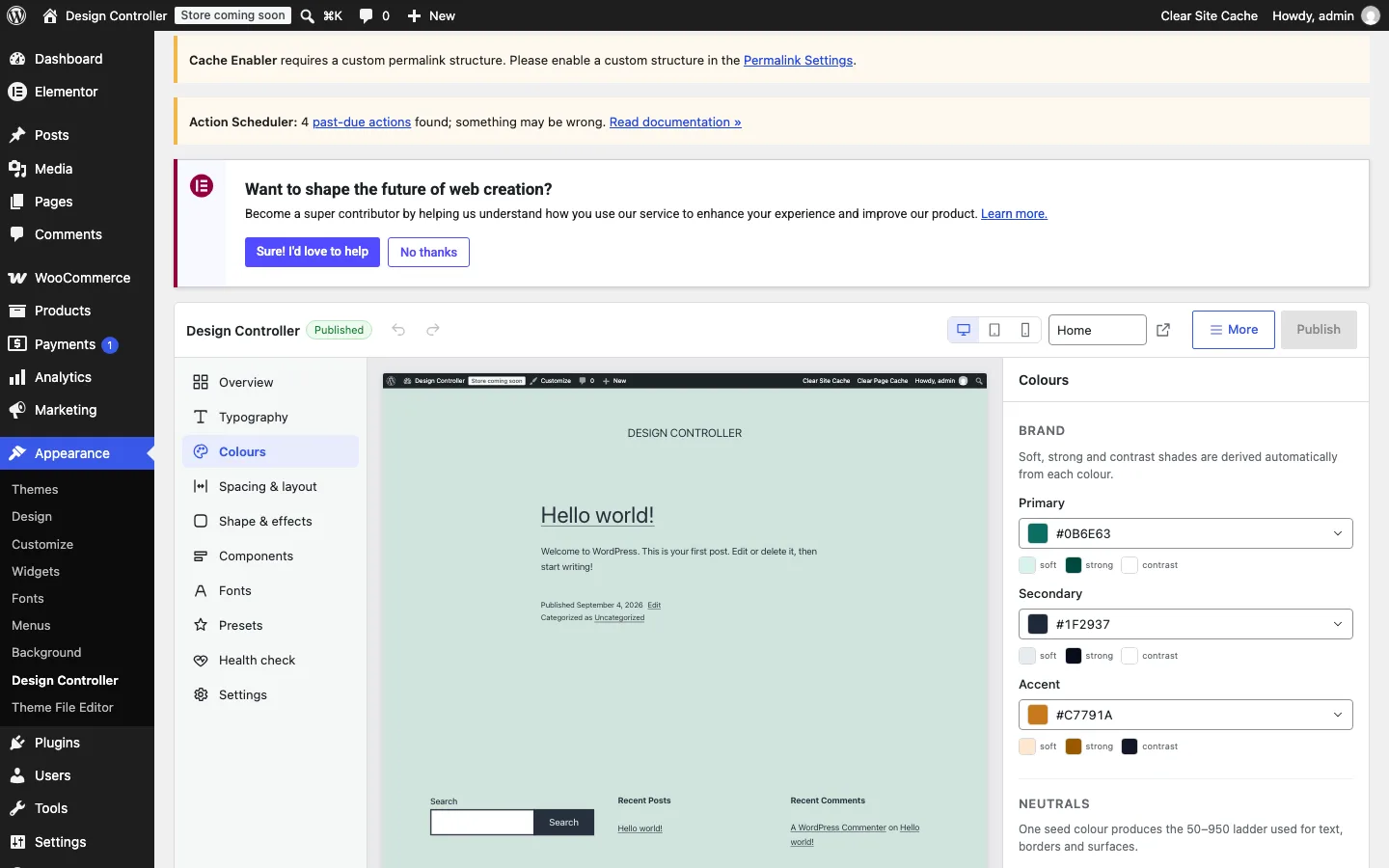
Your design lives in one document in the W3C Design Tokens format and reaches the site when a page renders: as CSS custom properties, as theme.json presets in the block editor, and as the values the theme, the builder and WooCommerce already read. Nothing is copied into another store, so nothing goes stale.
Custom properties everywhere
Every token is a --dc-* variable on the public site — one inline style, about two kilobytes — for any stylesheet, theme or block to use.
The editors follow
The block editor gets your colours, fonts and sizes as theme.json presets; WooCommerce buttons, fields and cards follow the components you manage.
Reversible by construction
Design Controller never writes into the Customizer, the Site Editor, Elementor's kit or Additional CSS. Deactivate it and the site is exactly as it was.
Three steps, and the site looks the same until you change something
Onboarding reads the values the site already uses and publishes them as they are. Your first publish changes nothing, on purpose.
Install and open
Upload the plugin and open Appearance → Design Controller. The wizard reads the colours and fonts your theme and builder already use and shows where each one came from.
Host your fonts
If the site loads Google Fonts, the wizard offers to host them on your own server — subset per script, printed by WordPress, so no visitor ever contacts a font provider.
Preview, then publish
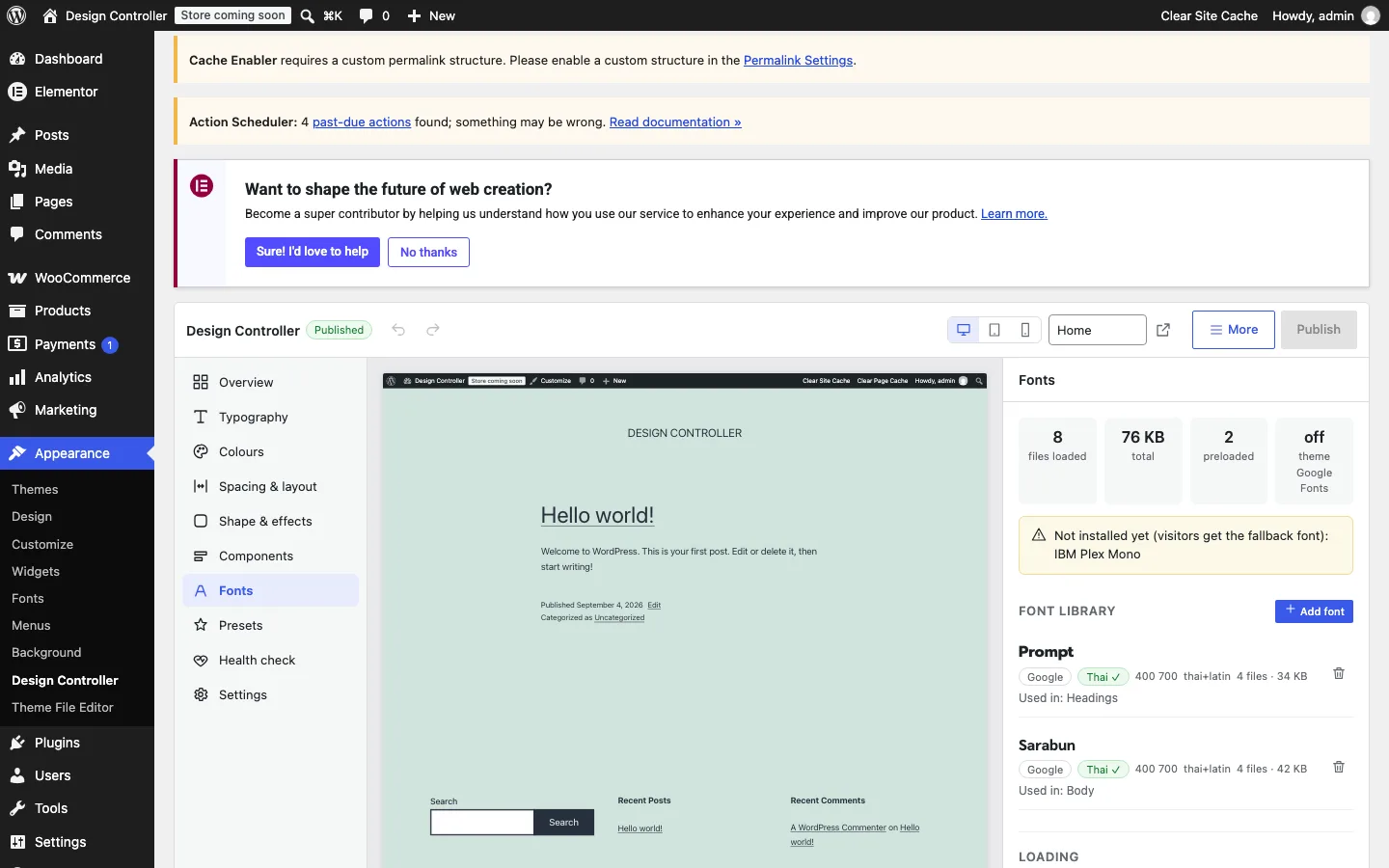
Change a value in the right pane and watch the real site update in the middle. Drafts autosave; publishing shows exactly what changes; every published version can be restored.
Why Design Controller
Thai-first typography
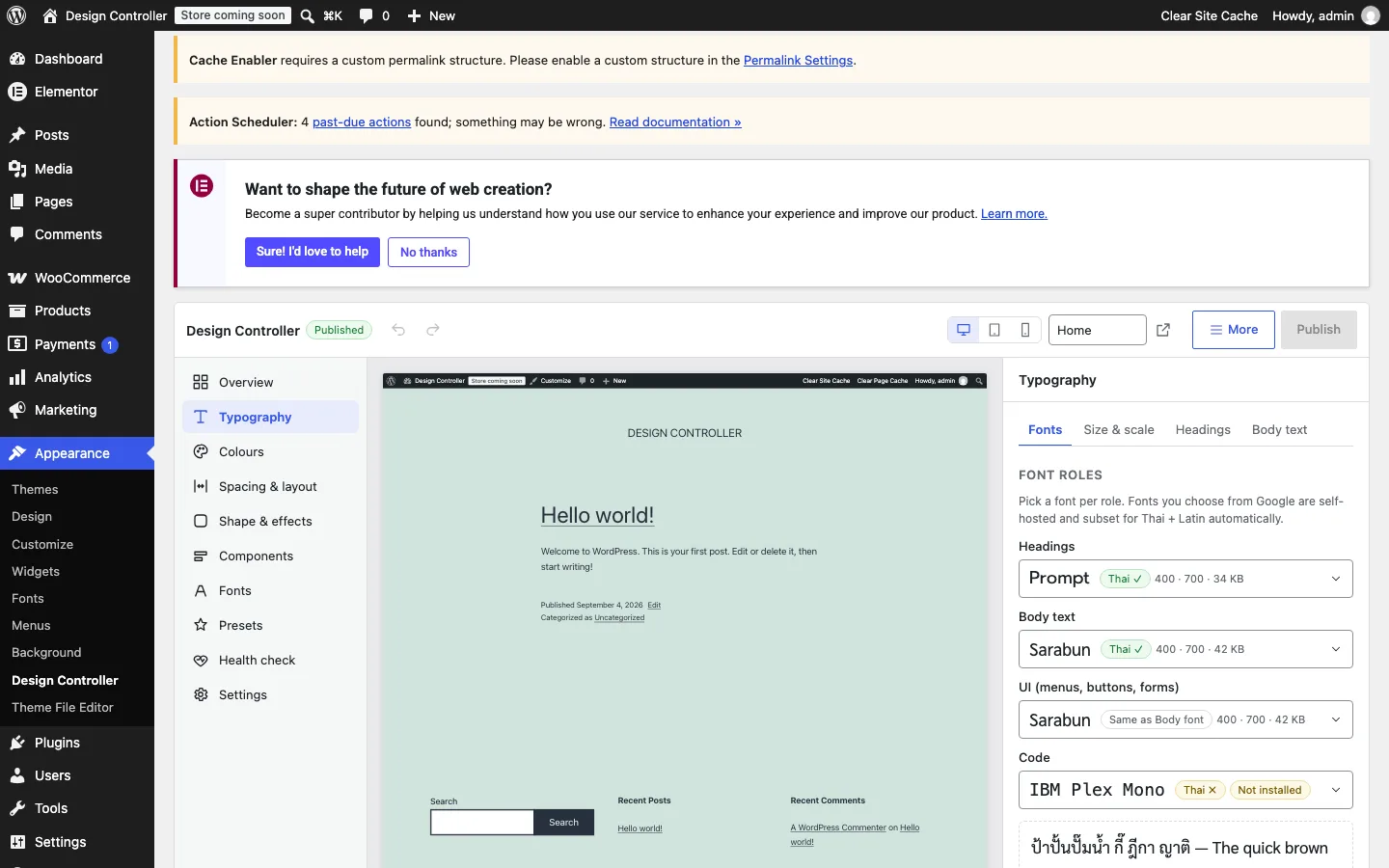
Every specimen shows Thai text with the vowels and tone marks that break first. Line-height guidance for Thai, a letter-spacing guard, Thai + Latin pairing per script, and a "Thai ✓" badge on every font source.
Self-hosted fonts, no layout shift
Pick a font from Google Fonts or Bunny Fonts and it is downloaded once into the WordPress Font Library as woff2, subset for Thai and Latin, with at most two preloads and metric-matched fallback faces so text never jumps.
Near-zero footprint
One inline style at wp_head, about 2 KB gzipped. Zero JavaScript on the public site, zero extra database queries — measured on every release, numbers below.
Live preview and safe editing
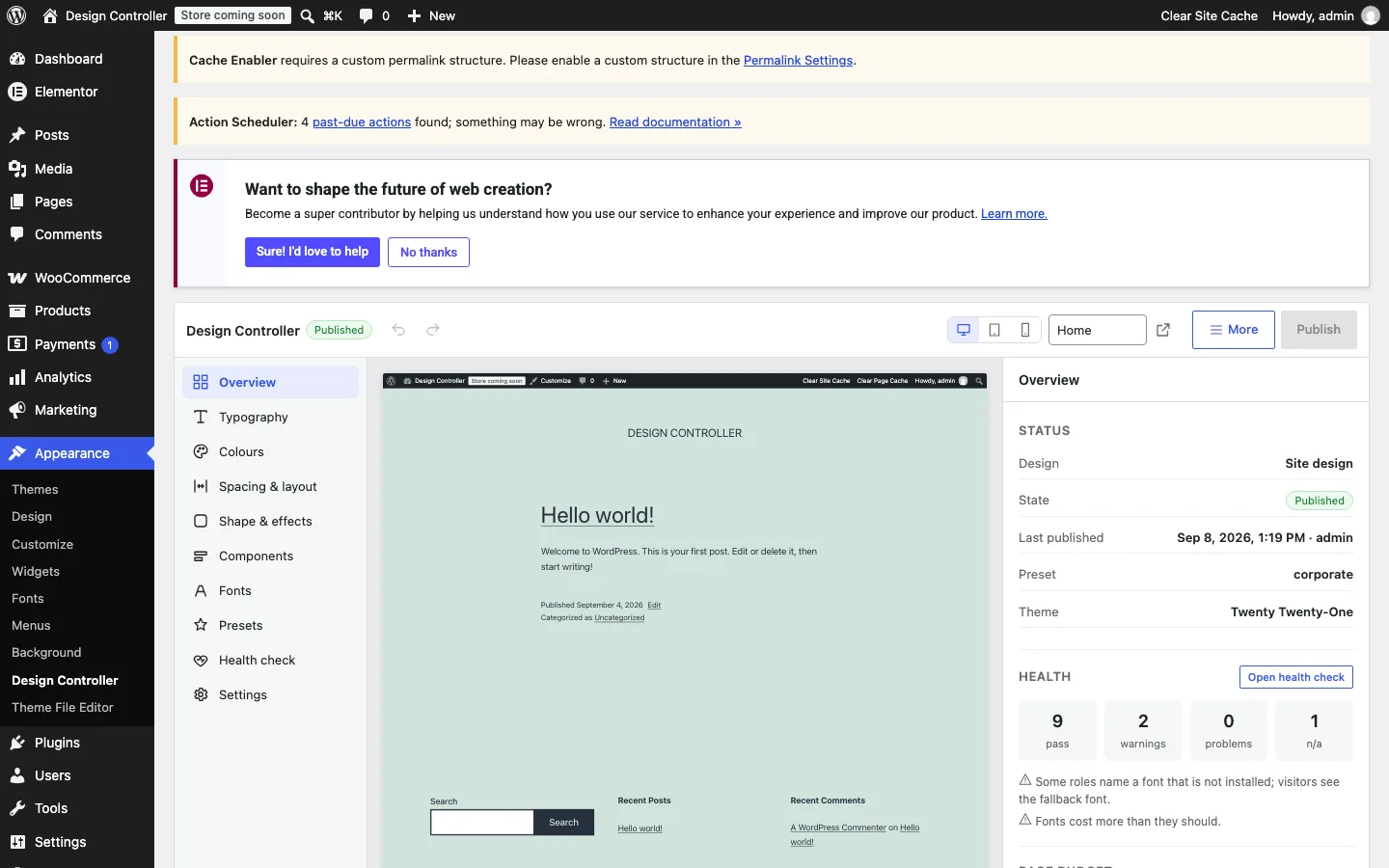
Three panes: the panels, a preview of your real site on desktop, tablet or phone, and the controls. Autosaved drafts, undo and redo, a publish dialog that lists every change, and a history to restore from.
Components as recipes
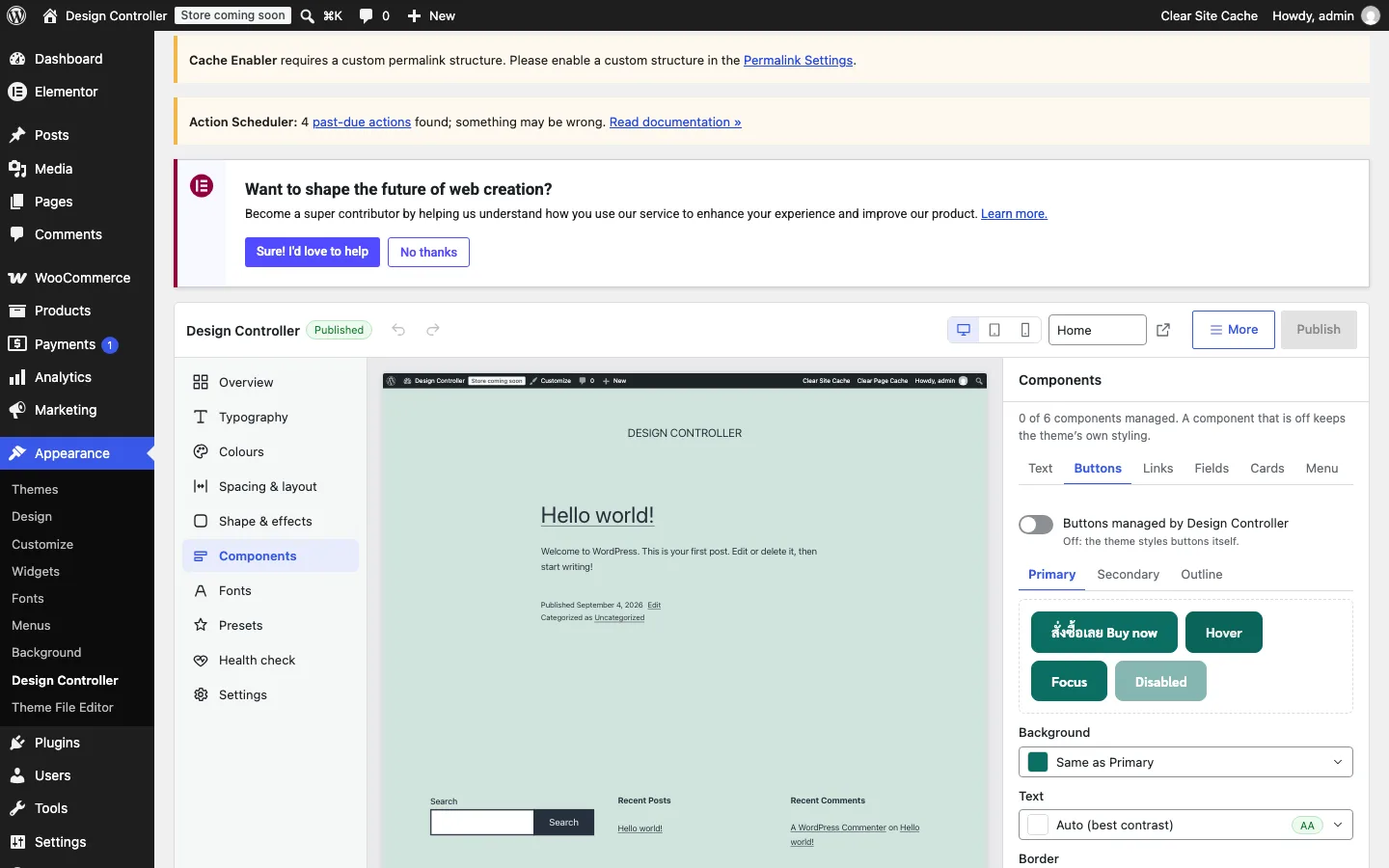
Buttons, links, form fields, cards and menus can follow your tokens on the theme's own selectors — switch one on per component and leave the rest to the theme.
Design Doctor
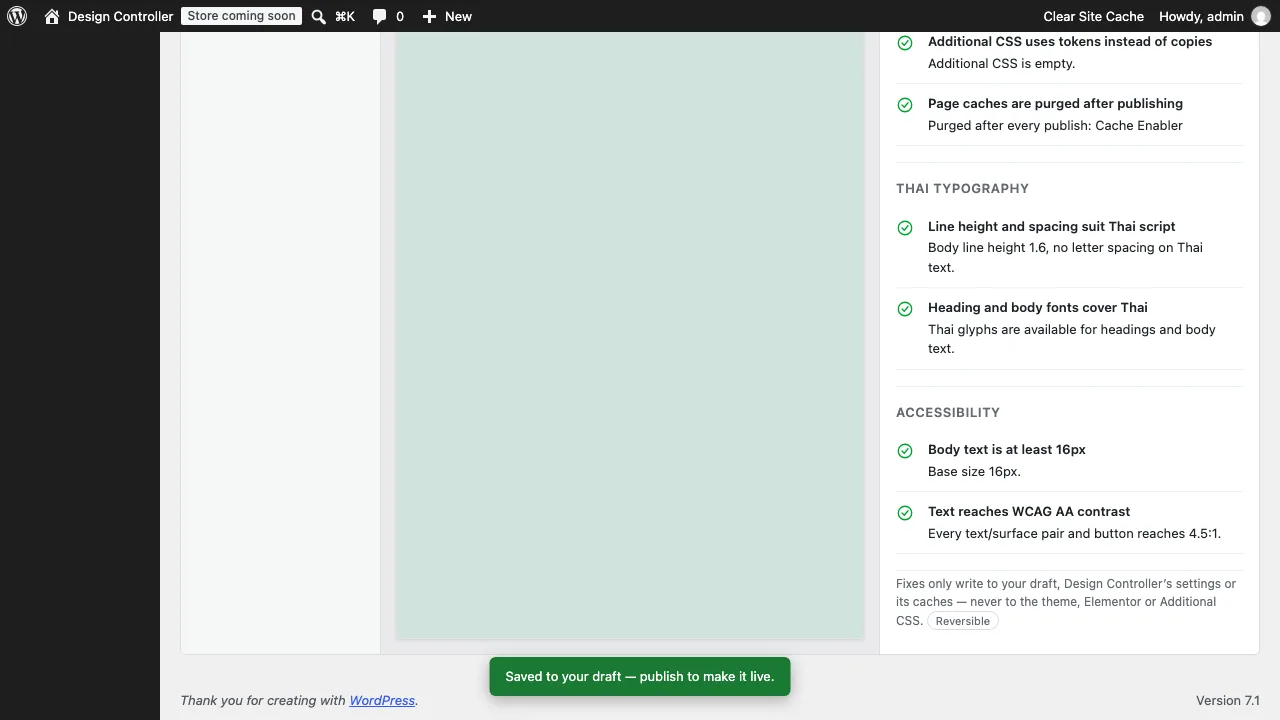
Twelve checks with safe, reversible fixes: fonts loaded twice, missing Thai glyphs, contrast below WCAG AA, body text too small, hard-coded values in Additional CSS, stale caches and more.
See it in action
Built for Thai text first
Most design tools treat Thai as an afterthought — a Latin font with a fallback nobody chose. Design Controller starts from the script that breaks first.
Specimens in Thai
Every font, size and line-height is shown on Thai text with stacked vowels and tone marks, so what would clip in production clips in the preview first.
Guidance that knows Thai
A line-height of at least 1.6 for Thai body text, a guard against letter-spacing on Thai script, and a minimum body size — suggested, never forced.
Pairing per script
A Thai family and a Latin family in one stack, each serving its own characters through unicode-range subsets, so a product name and a Thai sentence share a line in the faces they deserve.
Thai ✓ on every source
Google Fonts, Bunny Fonts and uploads are checked for Thai glyphs before they are offered, and the Doctor flags a face without them.
Design Doctor: twelve checks, twelve safe fixes
The Doctor reads the site the way a careful front-end developer would, and every fix it offers is reversible — it touches drafts, settings and caches, never the theme.
- Fonts loaded twice
- Font budget
- Missing fonts
- Contrast below WCAG AA
- Thai line-height
- Thai letter-spacing
- Fonts without Thai glyphs
- Body text too small
- Site Editor overrides
- Hard-coded values in Additional CSS
- Bridge health
- Stale CSS and cache purges
Checks run from the panel, over REST or with WP-CLI, so they fit a deployment pipeline as well as a Tuesday afternoon.
Measured, not promised
Every number below comes from the plugin's own PERFORMANCE document, measured on every release with the method written beside it.
0 extra queries, 0 scripts
The public site reads one autoloaded option and prints one inline style. A PHPUnit test counts the queries on every release and fails above zero.
−0.09 ms per page
wp_head() with Design Controller against wp_head() with its hooks removed, sixty runs each: the difference sits inside the noise of the measurement itself.
1.8 KB of tokens, 1.1 KB of recipes
Gzipped sizes of the inline CSS with every component switched on, against a budget of 4 KB each that the build enforces.
2 font preloads, 76 KB of fonts
A Thai + Latin pairing in two weights ships as eight subset woff2 files, and only the body face is preloaded — the Doctor warns before a budget is spent.
For developers
Everything the app does is available without it.
Tokens in your stylesheet
var(--dc-color-brand-primary, #fallback) in any CSS; dctl_token(), dctl_var() and dctl_font_stack() in PHP.
Hooks, REST, WP-CLI
Documented dctl_* hooks, a REST API under design-controller/v1, and wp dctl commands for publishing, presets, the Doctor and licensing.
Import and export
DTCG JSON in and out, byte-exact; a CSS variables file; Tokens Studio (Figma) import in Pro. Locked tokens and roles allowed to edit; an opt-in clean uninstall.
Free and Pro
Everything in the free build is complete and nothing in it is locked. Pro is a separate build that adds the integrations and the team tools below, priority support and automatic updates.
| Free | Pro | |
|---|---|---|
| Design tokens: fonts, type scale, colours, spacing, shape, components | ✓ | ✓ |
| Live preview of the real site, autosave, undo/redo, publish with diff, history | ✓ | ✓ |
| Self-hosted fonts with Thai/Latin subsets, pairing and CLS-free fallbacks | ✓ | ✓ |
| Block editor, WooCommerce and page-cache bridges | ✓ | ✓ |
| Design Doctor with 12 checks and safe fixes | ✓ | ✓ |
| Built-in presets, DTCG JSON and CSS export, style guide, REST, WP-CLI, hooks | ✓ | ✓ |
| Flatsome / UX Builder integration | — | ✓ |
| Elementor integration | — | ✓ |
| Team guardrails: locked tokens, roles allowed to edit | — | ✓ |
| Your own brand kits (save presets) | — | ✓ |
| Tokens Studio (Figma) import | — | ✓ |
| Priority support and automatic updates | — | ✓ |
The honest version: if your theme reads CSS custom properties and you use no page builder, the free build is the whole product. Pro earns its place on Flatsome and Elementor sites, where the theme options and the builder's global colours and fonts follow your tokens at render time instead of being copied by hand, and on teams where editors may change fonts but never the locked brand colour.
The same table the free plugin shows on its "Upgrade to Pro" tab.
Who it is for
Agencies on Flatsome or Elementor
Client sites arrive with theme options, builder kits and Additional CSS that disagree. One document, bridged at render time — and the next redesign is a preset.
Thai businesses and publishers
Thai text that sets properly from the first day: fonts that have the glyphs, line-heights that clear the tone marks, and no Google Fonts request per visitor.
Teams that hand sites over
Editors change fonts and sizes inside safe ranges; locked tokens stay with the administrator; every published version can be restored.
Pricing
Lifetime
- Flatsome / UX Builder integration
- Elementor integration
- Team guardrails: locked tokens, roles allowed to edit
- Your own brand kits (save presets)
- Tokens Studio (Figma) import
- Priority support and automatic updates
- Updates & support forever
- Pay once, never think about it again
Available soon
Frequently asked questions
Will it change how my site looks when I activate it?
No. Onboarding reads the values your theme and page builder already use and publishes them as they are. The site looks identical until you change something on purpose.
What happens when I deactivate or uninstall it?
Deactivating restores the site immediately, because Design Controller never modified the theme's, Elementor's or WordPress's own settings. Uninstalling deletes its data only if you opted in under Settings → Uninstall; fonts installed through it are asked about separately, because the Site Editor may use them.
Does it work with my theme and page builder?
The custom properties and theme.json presets work with every theme. Flatsome's theme options and Elementor's global colours and fonts are bridged at render time in Pro; WooCommerce's buttons, fields and cards follow the components you manage in both builds. Page caches are purged after every publish.
Where do I write my own CSS?
In WordPress's Additional CSS, as always — it prints after Design Controller and always wins. Reference the tokens (var(--dc-font-family-body)) instead of copying values, so your CSS follows the design.
Is any data sent to third parties?
Only when you install a font from Google Fonts or Bunny Fonts: the font files are fetched once by your server. Visitors never contact a font provider for a self-hosted font.
What happens if my Pro license lapses?
Nothing on your site. Bridges, locks and saved kits keep working exactly as published; automatic updates stop and Pro settings cannot be changed until the license is active again. The status shows only on the License tab, never as a notice.